Posts

Showing posts with the label assignment

Learning to use InDesign

Image
      We're finished with Photoshop and moving onto InDesign.     InDesign is a program used for storing and organizing compositions. All images need to be in CMYK instead of RGB because the former is for print instead of computer screens. Images need to be in 300DPI so that they're not pixelated when in print. In this video he creates a folder with lots of files in it.     Unlike the other Adobe programs, this one has pages. Putting something on the master page will put it on every single page. You can add something called a gutter but I don't know what that is just yet. The guy in the tutorial is using something called a frame and you can put an image in it. You can limit text boxes into the frames as well/
Autoscopy Project

Image
      For this project I had to take a photo of myself and edit it however I wanted to. Here is the photo I took specifically for this project.     I'm not making a very pleasant expression here, but it won't show up in the picture for reasons that will quickly become apparent. I downloaded lots of pictures that I could have used, but these are the ones I chose.     This is the final image, which took me 3ish hours to make.     There were a lot of different themes I was interested in doing, but I knew for sure that I wanted at least 3 sets of eyes. I ended up with 4 pairs by accident, but I didn't mind it enough to spend energy fixing it. I think if I wasn't doing this for a grade, I would've gone a lot more crazy with how much I did to the image. There's something appealing to me in a messy image, an image where there's so much going on that you can spend a while looking at it to make sure you're not missing anything.     I love t...

Somewhere Project

Image
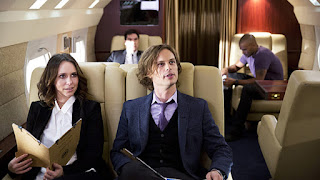
      I Photoshopped myself into a screenshot from the show Criminal Minds. It's not my favorite show ever, but it is my favorite realistic show (my actual favorite is an anime which I felt didn't count for this project). Spencer Reid is my favorite character, so I made sure to find an image with him in the center.     I knew I needed one of them either in the plane or sitting around the table for a case debriefing instead of a scene of them chasing the suspect because I don't have a prop gun to use and there was no way I was going to edit one in. I couldn't find any screenshots with an empty space next to Spencer (the agent in the forefront, if you're not familiar with the show), so I took on the extra challenge of covering up Kate (the agent who's sitting next to him). I didn't feel the need to mess with the agents sitting in the back- Aaron to the left and Derek to the right- because having them included makes the scene feel more whole and realistic.   ...

Inspiration for the "Somewhere" project

Image
       I think this picture from Kirby Jenner's Instagram would be really hard to Photoshop myself into. The pose is very complex, and there's lots of stuff going on in the background. I don't think I would be capable of successfully matching the colors and lighting.     I chose this picture from Average Rob's Instagram because the background looks like it'd be a criminal's hideout in Criminal Minds, or maybe a place where the BAU would find a body. I'm going to edit myself into a scene where they take down an unidentified subject.     I like that he made the other two's pants into shorts that are even shorter than the ginger guy's shorts (which aren't even short in the first place).     I'm not gonna make something that looks like this, but I chose this image because the person is cosplaying Izaya, my favorite character from Durarara.

Black and White to Color Project

Image
      For this assignment, we had to take a picture of us and turn it from black and white into color. I chose this picture of myself because, in spite of the giant acne spot on my chin, it's a very good photo of me. Plus, I took it in my hometown, which I miss very badly right now. Each picture took roughly an hour and a half to make.     This is the first color palette I used, and it's my favorite.     The orange on my skin wasn't the best artistic choice I've ever made, but I didn't dislike it enough to change it. I think the red background provides a good contrast to me. I do wish I had made the buttons on my shirt stick out more; when I was making it, the buttons looked much more noticeable.      This is my second color palette. It's alright, not the best thing I've ever made.     Once again, the buttons bother me. The blue background gives a change in tone from the first one. I also decided to put a tiger over the acne sp...

Logo Tag Brush

Image
    I made this art piece with the tag I made in Photoshop. The tag was created from the black and white logo I made in Illustrator for a previous assignment. I placed two of the tags together, but then I dragged the brush around for fun.     Here is the tag just by itself.     I put the scratch effect on the tag to make it look like it's sprayed onto a wall like graffiti. I used the negative effect to make it look like there was an eye on the long part of the paint splatter; I really like eye imagery so I thought it was cool that there were circles in the image the professor gave us. Despite all the visual noise around it, the viewer is till able to tell that it's a drawing of a fish. The only bad thing to say about this is that some of the streaking effect crosses right over the top fin, which makes the detail difficult to see. Other than that, it's completely obvious that this is a crying clown triggerfish. Well, it's obvious that's a fish, but only fish...

Learning to Use Photoshop

Image
      Now that we're finished with Illustrator, it's time to move on to Photoshop. I'm glad she's going to teach us how to use it because I want to make better memes than what I'm currently capable of with my phone. I am afraid that I won't be good at using it, but I surprised myself with the art I've been able to make so far, so hopefully that'll be the case this time too.     Here's the first tutorial video I found.     This video explains the multiple keyboard shortcuts you can use to control the layers. I didn't use layers very much in Illustrator, but I'm hoping to use them more in Photoshop. You can put an image in for the background and press the shift button to change the size but keep the image at the right scale.     This is a tutorial on how to transform stock photos into cool fantasy art.     From what I've seen in this video, I think I'll prefer Photoshop's selection tool more than the one in Illustrator. You can al...

Propaganda Project

Image
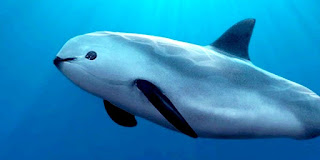
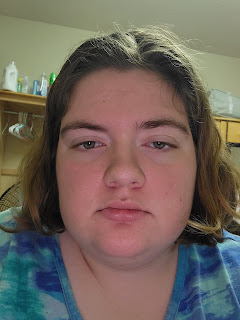
     This project took me roughly 3 hours.  I chose to make my poster about the vaquita porpoise to raise awareness about them because there are less then 30 left in the wild. They'll most likely go extinct within my lifetime, but I do things like signing petitions and raising awareness for them in hopes that the population can recover. This is the picture I used for reference.     This is the picture I used to make the self portrait. I scraped my knee really bad the day this picture was taken, so I might look a little pained in it.     Without further ado, here is my propaganda poster!     Professor Roundtree did edit this to add a black shadow to the words, and she made the "Vaquita" bigger to put more emphasis on it since it's a unique word. This is also the project where I learned how to convert an Illustrator file into an image that can be shared online. Funny how I just figured this out right as we move on from Illustrator.

Logo Project

Image
    For this project, I looked at a clown triggerfish for inspiration.     I picked this fish for two reasons: 1) I consider myself to be quite the clown because people tell me I'm funny and 2) we have one of these at the aquarium where I work and all the workers including me love pointing it out to the guests because it's a baby.     Overall, this took about 3 hours.

Calligram Project

Image
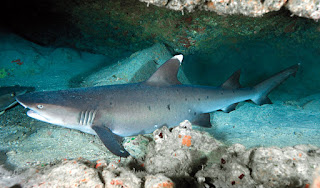
      For my calligram project, I traced this shark.     This is a whitetip reef shark, my favorite shark species. It's my favorite species because they spend all day cuddling and hunt together at night. There are two of these sharks at the aquarium where I work, so I get to be up and personal with them very often.     Here is my calligram project, which took about three hours , frustration breaks included.         I personally don't like it, but my professor said she likes how the inside shape invokes the idea of the ripples of the water. Although the coding project took a significantly longer amount of time, I liked doing that more because it was easier to make it do what I wanted. I would love to get better at using Illustrator, but I don't have high hopes, haha.

Learning to Use Illustrator

Image
   the video     I'm really nervous to work with Illustrator because of how many buttons there are on the tool bar. I watched this guy make various shapes and I have no idea how I'll be able to do that. I would love to be able to use Illustrator to make fanart for my favorite stories, but even if I did figure out how to use it, I still can't draw. I don't understand how control points work, so that will be hard to learn. the video     This video made me less nervous about making curves with the pen tool. It seemed very hard to do when playing that practice game, but that's because there were certain nodes you had to meet. When doing it free-handed you can put the control nodes wherever you want. This video also showed me that I could trace images, which will help me practice drawing the things I want to. the video     I learned that you can pick what tools are available on your tool bar. This way I could customize the tool bar to only have the too...

Todoroki Disgraced, my final coding project!

Image
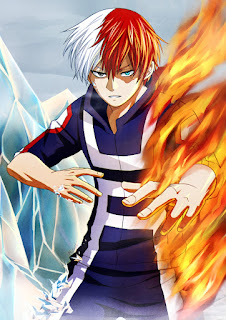
    To make my project, I looked at this image for a reference.     This is Todoroki from Boku no Hero Academia. He's my favorite character, so I figured I would do a portrait of him. It seemed like it would be easy because a face is just a bunch of circles, but I was in for way more than I knew when I first started working on it. All together, finishing this took roughly 8 hours and 30 minutes.     Without further ado, here is my project, Todoroki Disgraced.     Getting the gradient of the background and the base of the face was easy, but everything after that was a struggle. My first obstacle was to switch the gradient of the scar from going side-to-side to up and down. Then I struggled with putting lines in that didn't affect the strokes on other shapes, but others in the class had the same problem, so Professor Roundtree figured out what we were doing wrong and helped us. The Bezier curve gave me the biggest struggle of all- I didn't quite get...

History of the Internet

         The Internet - what is it? Well, that's what I'm posting on right now with this blog. Of course, for this assignment, I need to give a detailed definition of what it is. I'm going to look it up on Google; it's ironic that I'm researching about the Internet on the Internet! According to The Guardian, the Internet is an interconnected web of cables and wires that "allows computer networks around the world run by companies, governments, universities and other organizations to talk to one another"(1). The invention of this amazing web of communication is credited to two scientists named Robert Khan and Vinton Cerf (2). They originally used it for transferring data packets between two computers, which we still do to this day, but on a much larger scale as well as many other things.     The World Wide Web - the 'www' that is at the beginning of every website URL- is a way to view all the information that the Internet offers. The web, which is o...